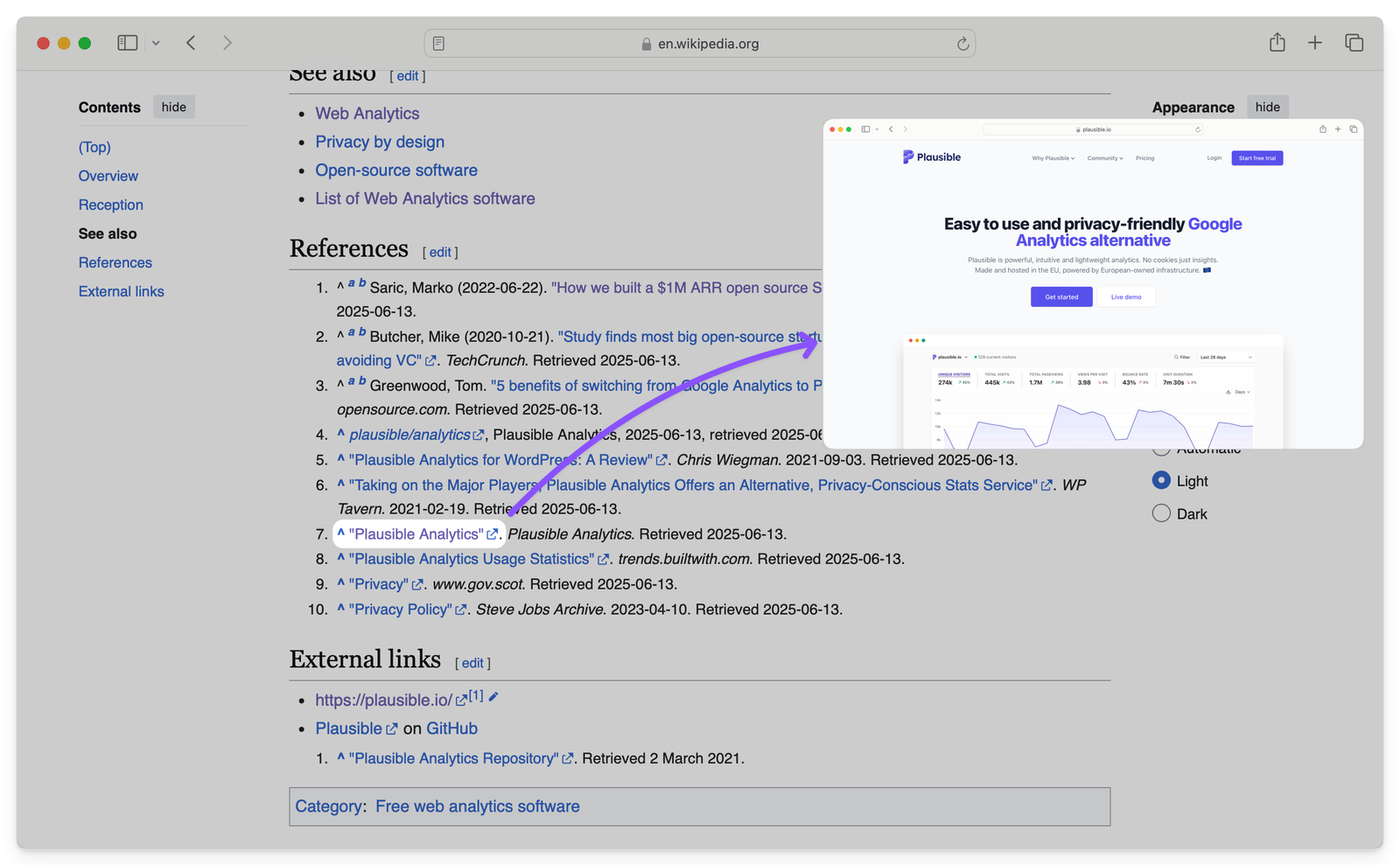
Backlinks are when another website (another domain) links back to you.
If any blogger, company site, or basically any site includes a clickable link to your site, that is a backlink, also known as an “inbound link.” For eg., We have a backlink from Wikipedia, and you can check out the image above to see what it looks like.👆
Think of it like a whole network of webpages linking to a few of each other which makes navigating the web easier. It also helps in writing content itself as you can cite your resources, add references, etc., by linking to the relevant webpage.
- Why are backlinks important?
- Good vs okay vs bad backlinks
- Backlink checkers
- How to get backlinks?
- How not to get backlinks?
- How to check if backlinks are leading to traffic improvements?
- Backlink Audits
- FAQs
- Track whether your backlinks are actually working
Why are backlinks important?
In SEO terms, backlinks act as signals of trust and authority to search engines like Google. When other websites link to your site, it essentially means that “This content is useful and worth referencing,” and search engines take that as a positive signal. In turn, they rank you higher on the SERPs and you ideally get more traffic.
A little backstory…Google’s algorithm was originally built around this idea. Pages that received more links naturally tended to be more helpful, so Google began using backlinks as a core ranking factor. They themselves have accepted that.
So what then? If you get a few sites to link back to you, you’ll start enjoying high rankings in Google and get a ton of organic traffic? It’s not that simple.
Good vs okay vs bad backlinks
Think of backlinks like recommendations from around the internet. Here’s what separates a good and rather useful backlink from the not so good ones:
They come from reputed domains
A link from a high quality, relevant website is far more valuable than dozens of links from low quality or spammy sites.
A “quality” website in this case is trustworthy, authoritative, and relevant to your industry. For example, a link from a major news site or a reputed industry blog in your field would be more useful than a link from an unknown or poorly maintained website.
What does “authority” mean in SEO?
When we say “authority” in SEO, it means how trustworthy and credible a website appears to search engines, based on how strong a website’s backlink profile is compared to others.
Google itself does not publish a specific “authority” score. But major SEO tools like Moz, Ahrefs, and Semrush have created their own metrics to estimate a site’s authority which gives people a point of reference and something to work off of. The metrics are called:
- Domain Authority (DA) in Moz
- Domain Rating (DR) in Ahrefs
- Authority Score in Semrush
Higher the score, better the authority. Every strong backlink you earn helps build your site’s overall authority, making it easier for your future content to rank as well.
They are contextually placed
Search engines also look at context. A backlink placed naturally within a helpful article is more valuable than one placed randomly in, say, a comment section. Google is good at understanding (especially now, after years of algorithm evolution) whether a link was earned because of great content or created purely to manipulate rankings.
The anchor text is helpful
The anchor text is the clickable text used in a hyperlink. Search engines, and of course readers, use anchor text to understand what the linked page is about.
A good backlink uses natural, descriptive anchor text that fits the context of the article. For example, if your site or webpage is about email marketing, a helpful backlink might look like: “Learn more about email deliverability best practices here.”
So, “email deliverability best practices” tells Google what the linked page covers (and basically helps reinforce the relevance of your page for that topic).
On the other hand, low quality backlinks often use vague or spammy anchor text like: “Click here” or “learn more” or “this.”
They are “dofollow” links
A “dofollow” link (I just backlinked to Semrush for dofollow links btw, this is backlinking live in action) allows search engines to follow the link and pass authority from the linking site to yours.
Some links are categorically marked as “nofollow,” which tells search engines not to pass ranking credit. They can still bring you traffic and visibility, but technically speaking: dofollow links are the ones that directly strengthen your SEO.
For example, a normal dofollow link looks like this in HTML:
<a href="https://example.com">SEO tools</a>
A nofollow link looks like this:
<a href="https://example.com" rel="nofollow">SEO tools</a>
Wikipedia is a well known example of this. All external links from Wikipedia use the rel="nofollow" attribute.
Even though such links can send traffic and add credibility with readers, it does not directly pass SEO authority in the same way a dofollow link does – technically speaking.
They send real referral traffic
Strong backlinks are mainly for reader-experience and search engine optimization is a side-effect of that. That’s essentially what Google is trying to do as well to determine your rank-ability – whether you’re good enough for showing as a top result to its users.
If a backlink is placed on a popular article that people genuinely read, it can drive high quality traffic consistently.
They come from unique domains
It is usually better to earn links from many different websites than many links from the same site.
Ten backlinks from ten different authoritative domains would carry more weight than a hundred backlinks from a single domain. This shows that your content is being recommended across the web, not just by one source.
Backlink checkers
By now, you have gotten a good idea of what backlinks are! You must be curious about how many backlinks you have and which ones.
All you need to do is open the search engine you use and type backlink checkers and you’ll get a ton of free backlink checkers.
Just add your domain name and you will get a list of your website’s backlinks, and usually a lot of other info as well.
Backlink Analytics
Backlink checkers give you many reports, depending on the tool you’re using. It’s even better if you’re already subscribed to an SEO tool of your choice.
We checked ours using Semrush and here’s a snapshot of what we got:
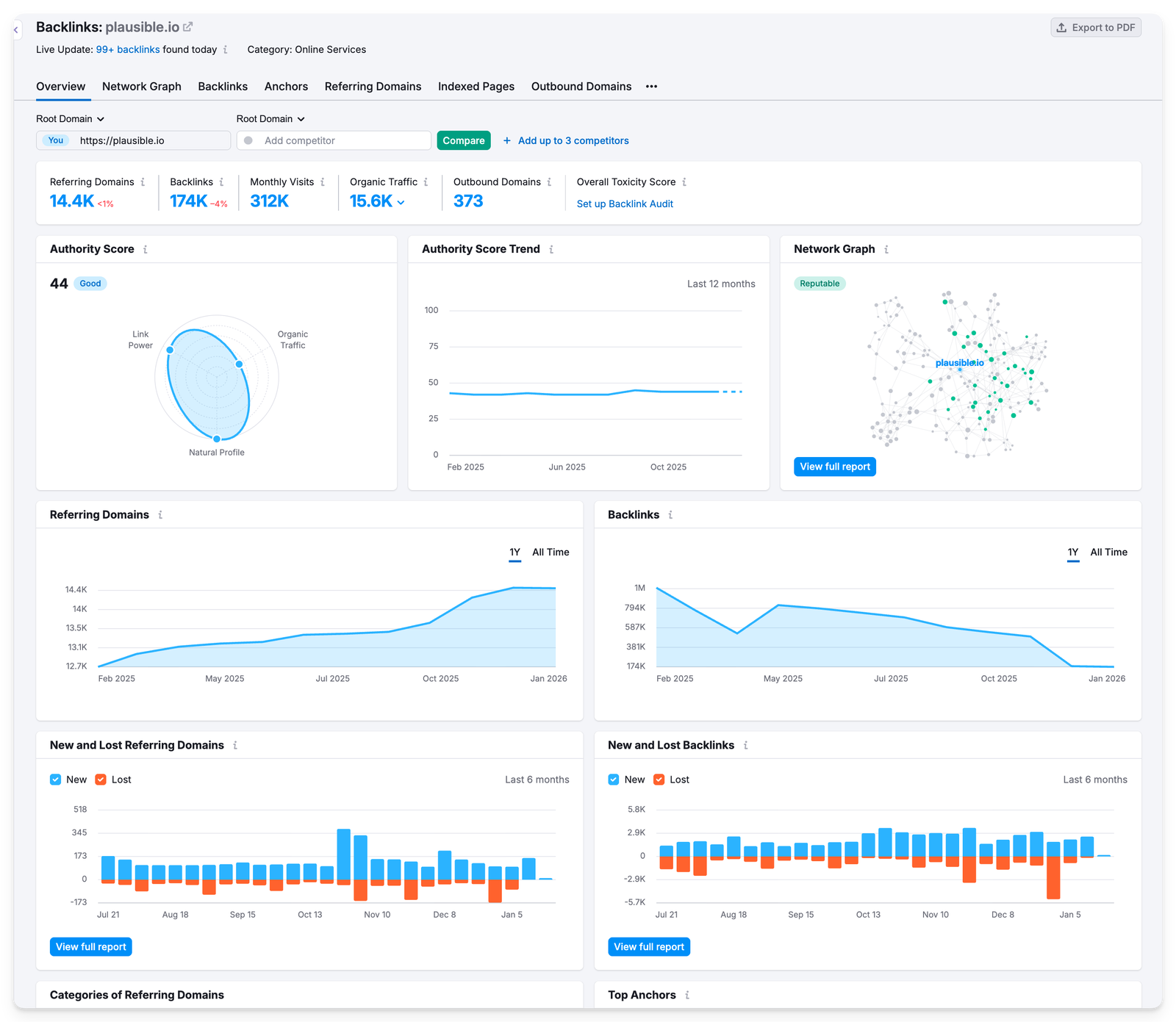
We can see a LOT through these reports. On this dashboard alone, we were able to do the following.
- Add competitors to compare our backlink profile to theirs. Yes, anybody’s backlink profile is publicly available.
- See if our domain’s authority score is good based on the reputation of our backlinking network graph.
- See our backlinks’ toxicity score (to see how many “bad” backlinks we have)
- Visualize trends in graphs
- See the categories of referring domains (IT, online services, Marketing, etc.)
- Top anchors
- A breakdown of referring domains by their authority scores
- Types of backlinks we’ve earned (image, text, follow, nofollow, etc.)
- Countries, TLD distribution, top pages that get backlinks
How to get backlinks?
Okay, now we know what backlinks are and where you stand currently. The next step is to understand how to get backlinks.
There are two ways of getting backlinks: automatically and manually. By automatically, we mean you just focus on putting good content out there and wait for it to get discovered by people who would genuinely find it useful to link to. This is organic, natural, fuss free, saves you time, effort and money but requires patience. It’s what the search engines ideally expect too, i.e., that they don’t get gamed.
That’s how we’ve done it at Plausible. We’ve generated hundreds of thousands of backlinks but never worked on getting a single backlink manually. Having said that, here’s what did help:
- We try to create as useful content as possible (and original researches) that organically attracts backlinks.
- Word of mouth leading to natural “review” posts, videos, listicle recommendations, etc. When people genuinely like your product or content, they talk about it.
- Marketplace listings (mostly organic)
- Being an analytics tool, many subscribers mention us and link to our data policy in their own privacy policy pages. These are organic, contextual backlinks created as a side effect of product usage.
…so, if your product or content is genuinely useful, solves a real problem, and reaches the right audience, your backlink profile can often build itself over time.
Like, a well-written comparison article or a unique industry report may get picked up by bloggers, journalists, or forum discussions months or even years after it is published. These links compound over time without any direct outreach from your side.
Also worth noting that as a side-effect of writing useful content on the internet: you’ll almost always generate some backlinks automatically. The question is whether you’re okay with solely relying on that or want to speed it up by manual backlinking strategies as well.
Manual backlink building methods
Manual backlink building means actively promoting your content or site to earn links. The only catch with these methods is that you would need to hire someone: an in-house person or a full team or an SEO agency to do these things for you.
Guest posting on relevant websites
You can write articles for other popular blogs or publications in your industry and include a contextual backlink to your site. You get full control on what to write and spread the word out there.
Be sure to provide real value to the audience of the site you are writing for. Low quality guest posting done at scale no longer works and can even turn out to be counter-productive by hurting your brand’s perception.
Creating linkable assets
Some content types attract more backlinks than others, like:
- Original research and surveys
- Free tools or calculators
- Definitive guides and tutorials
- Infographics
People naturally link to these assets when they need to reference data or recommend a resource.
Broken link building
You can look for broken links on other websites and suggest your content as a replacement.
For example, if a blog links to a resource that now throws a 404 response, you can reach out to the author, point out the broken link, and recommend your relevant content instead. This both helps the site owner and earns you a backlink.
There are broken backlink checkers available now:
- Just put the domain of the site you want to get a backlink from.
- Get a list of the links in their content that no longer work due to the linked page being broken or any such reason.
- Reach out to the author or the content team of this blog for replacing this link with yours. Wait and watch.
Unlinked brand mentions
Sometimes websites mention your brand or product without linking to it. You can find these mentions and politely ask the author to turn the mention into a clickable link. Since they already know your brand, your chances of getting the link are often high.
Competitor backlink analysis
By analyzing where your competitors get their backlinks from, you can identify opportunities for your own site.
If a website links to multiple competitors in your niche, there is a good chance they may also be open to linking to you, provided you offer something comparable or better.
Again, an SEO tool offers such reports if you’re subscribed to the right plan.
Resource pages, roundups and libraries
Many websites maintain “resources” or “recommended tools/content” pages. If your content or product genuinely fits, you can reach out and suggest it for inclusion. This works especially well for tools, educational content, and open source projects.
You will also find many platforms like Appsumo, SaaSHub, AlternativeTo where you can submit your startup/site for discoverability and backlinks.
How not to get backlinks?
Do not buy backlinks
It is a black hat SEO trick which is a hard NO. This would only do more harm than good. You would easily find a lot of sellers with enticing claims of getting you an instant ranking boost but they just don’t work anymore as the ranking algorithms have gotten smarter.
In extreme cases, buying backlinks can get your site permanently excluded from Google’s search results too.
Do not spam comments and forums
Dropping links in blog comments, forums, or Q&A sites purely for SEO value also does not work anymore. It’s fine if someone is sharing your link somewhere it adds genuine value or has been asked for.
Most of these links are anyway nofollow, heavily moderated, or removed entirely. So turning it into a war-room type strategy can harm your brand reputation and also get you banned entirely from communities. Case in point: Reddit.
Do not trade links excessively
AB or ABCD link exchanges are very common. If you have a web presence, you will start getting so many emails about link swaps. If you happen to find a genuinely nice cross-linking opportunity, it’s fine.
But if you turn it into a mindless strategy at scale, you’ll end up creating unnatural linking patterns.
This is the most common way of generating backlinks but that is exactly why there’s so much low quality spam out there which you must steer clear from.
How to check if backlinks are leading to traffic improvements?
Backlinks are not an end goal by themselves. What really matters is whether they help improve visibility, rankings, and actual traffic.
Here’s how you can check if more backlinks = more traffic for you. Do give a few weeks or months for the results to show up.
Track referral traffic growth over time
Backlinks, if they are actually being clicked wherever they’re placed, would lead to more direct traffic from referral sources.
If you want to be even more specific and are expecting traffic from a certain, high-value backlink: you can also check if you’ve been getting traffic from that specific domain itself.
Even if a link does not pass SEO authority, referral traffic alone can make it valuable.
Track organic traffic growth over time
This is the main one as backlinks are supposed to influence organic traffic indirectly by improving rankings.
So compare your organic traffic before and after earning strong backlinks. This should be done over weeks or months, not days, since search engines take time to process new links and we’re looking for high-level trends here.
You need a web analytics tool to track this. For instance, in Plausible, you can directly see your traffic grouped by specific channels like referral and organic search (includes AI search traffic too).
In this example, you can see traffic to the blog grouped by acquisition channels over the last 91 days and compared to the previous period (check interactive dashboard here).
The green arrows indicate growth. Hovering over the arrows would show you growth in percentage terms as well.
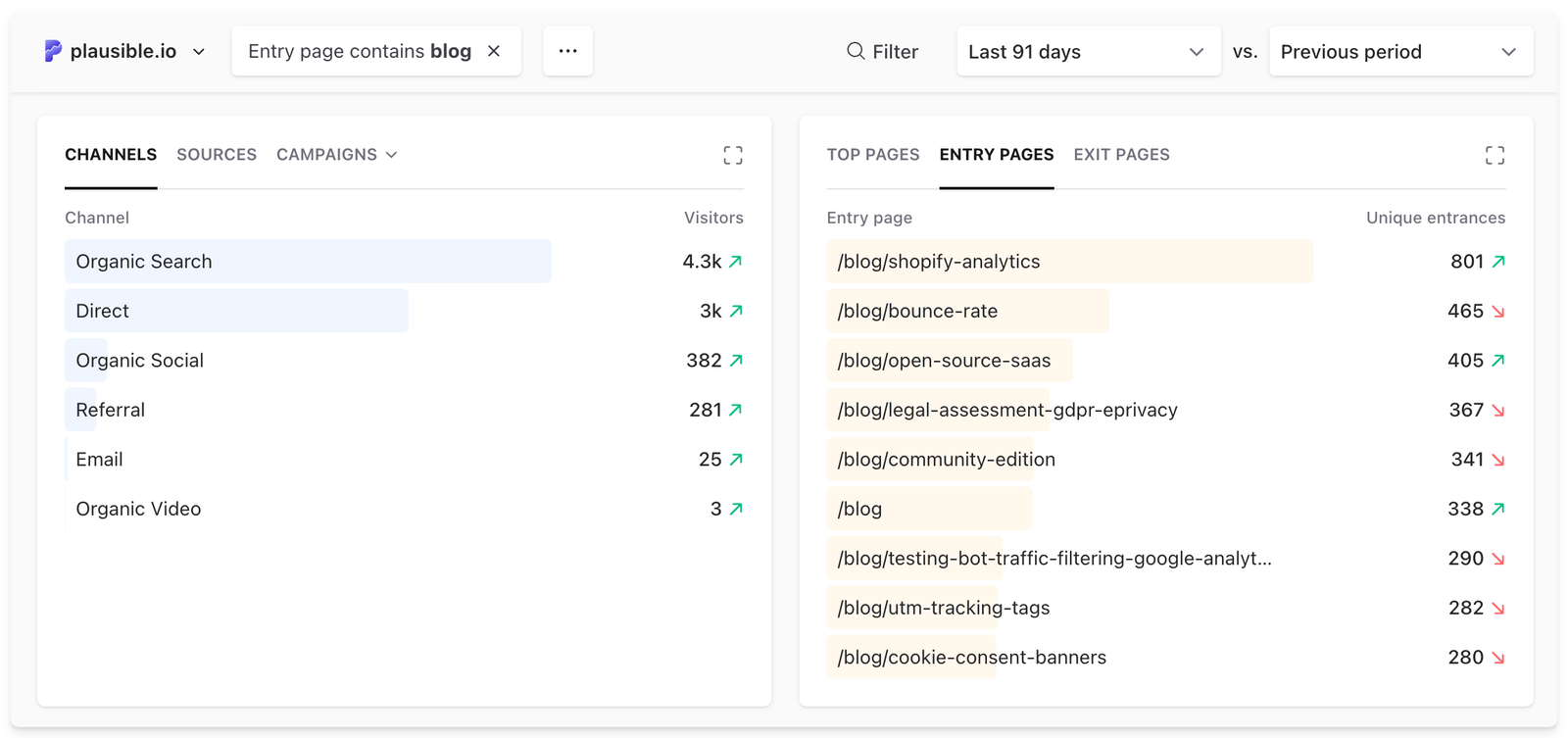
Here, organic search is growing, which suggests improved visibility in search results. Referral traffic, on the other hand, shows visitors who clicked through from links on other websites. This is the most direct way to see backlinks working.
You can also go one level deeper by clicking into the Referral channel to see exactly which domains are sending traffic. This allows you to identify high-value backlinks that are not only helping SEO, but also bringing in real visitors.
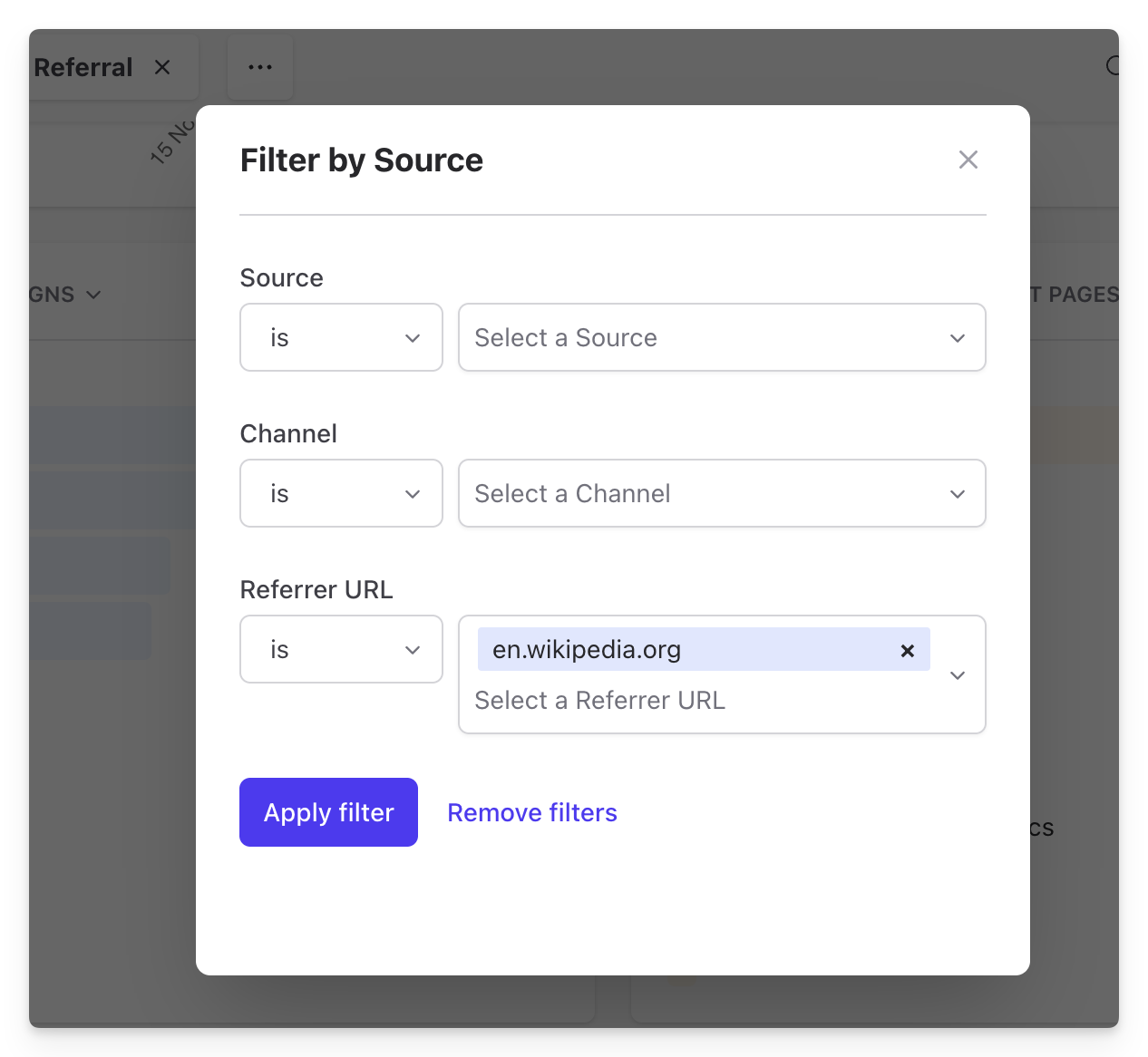
You can do the same by clicking on “organic search.” If you click on “Google” you will be able to see the exact search terms bringing in traffic too.
The key thing to look for here is not sudden spikes, but steady trends.
If you’re not tracking this yet, see how Plausible groups traffic by acquisition channel in our live public dashboard. Or start a free trial to measure it for your own site.
Focus on trends, not individual links
It is hard to attribute traffic gains or conversion improvements to a single backlink. Some visitors may arrive through a backlink, leave, and return later via search or direct traffic.
Instead, look at overall trends:
- Is your backlink profile improving in quality?
- Is organic traffic trending upward?
- Are more pages starting to rank?
- Is overall traffic improving?
When backlinks are working, the impact is usually cumulative and long-term, not instant.
Monitor keyword rankings
Backlinks often help pages rank higher for existing keywords or start ranking for new ones. This can be done as part of backlink analytics explained above.
With an SEO tool, you can track the keyword rankings of pages that received backlinks. Or if you don’t want to go so specific, just look at high-level trends like:
- Are rankings increasing?
- Are new keywords being added?
- Is the authority score improving?
Combine SEO tools and analytics for clearer insights
SEO tools help you understand why rankings may be changing, but they do not show you what users actually do on your site. The most reliable way to evaluate backlinks is to combine both data sources.
For example an SEO tool shows that your product page gained rankings but Plausible shows if that page contributed to conversions.
This way, you can be confident your backlinks are contributing to traffic and in some relevant cases, conversion improvements.
You can set up goal conversions in Plausible to tie referral traffic directly to signups, purchases, or any other action that matters on your site.
What if you’re seeing negative trends even after making all the efforts?
Backlink Audits
A backlink audit is the process of analyzing all the websites that link to your site and evaluating the quality of those links. You can either do this in response to noticing negative trends or just as a hygienic cleanup.
This will typically help you look at:
Link quality and toxicity
The tool checks whether a linking site looks spammy, artificially created, or part of a known link network. Links from low trust domains, irrelevant niches, or suspicious pages are flagged as potentially toxic.
Authority of linking domains
Backlinks from strong, authoritative sites are marked as valuable, while links from weak or low reputation domains are marked as risky.
Follow vs nofollow ratio
A natural backlink profile contains a mix of dofollow and nofollow links. An unnatural pattern, such as an unusually high number of keyword stuffed dofollow links, can be a red flag.
Anchor text distribution
Whether your anchor texts look natural or over-optimized. Too many identical keyword anchors can signal manipulation and down-rank you.
Link velocity and patterns
Sudden spikes in backlinks from low quality sites may indicate spam attacks or poor link building practices.
After running a backlink audit, you usually end up with three groups of links:
- Healthy links that help your SEO
- Neutral links that are harmless
- Toxic links that may hurt your rankings
For harmful links, you have two main options:
- Contact the site owner and request removal
- Use Google’s Disavow Tool to tell Google to ignore those links
This process helps ensure that your backlink profile reflects genuine editorial recommendations, not artificial manipulation.
FAQs
How to find competitors’ backlinks?
You can use the backlink checkers as explained above. Use an SEO tool of your choice such as Morning Score, Semrush, Neil Patel, etc., and enter a competitor’s domain and open their backlinks or referring domains report.
This shows you which websites link to them, which pages attract the most links, and what anchor text is being used.
You can also do some manual research by searching Google for things like:
“best tools for [your industry]”
or,
“[competitor name] review”
This helps uncover links that may not be obvious at first glance.
How many backlinks do I need?
There is no fixed number. It depends on:
- How competitive your niche is
- The authority of your site compared to competitors
- The quality of backlinks, not just the quantity
A good rule of thumb is to look at the pages currently ranking for your target keywords. If they have strong backlink profiles, you will likely need backlinks of similar quality to compete.
Focus on earning better links than your competitors, not simply more links.
How to disavow backlinks?
Disavowing backlinks means telling Google to ignore certain links pointing to your site.
You should only do this if you believe harmful or spammy backlinks are negatively affecting your site and you cannot get them removed manually.
The general process looks like this:
- Create a list of links to disavow. To disavow a domain (or subdomain) prefix it with “domain:”
- Upload your list to the Disavow links tool page
Use this carefully though. Google is generally good at ignoring low quality links on its own. If your site has not been involved in link schemes or manual penalties, you often do not need to disavow anything at all.
Track whether your backlinks are actually working
The only way to know if your backlinks are sending traffic is to measure it. Plausible shows referral and organic traffic side by side, lets you filter by source, and connects traffic to conversions. No cookies, no personal data collection, one script tag to install.