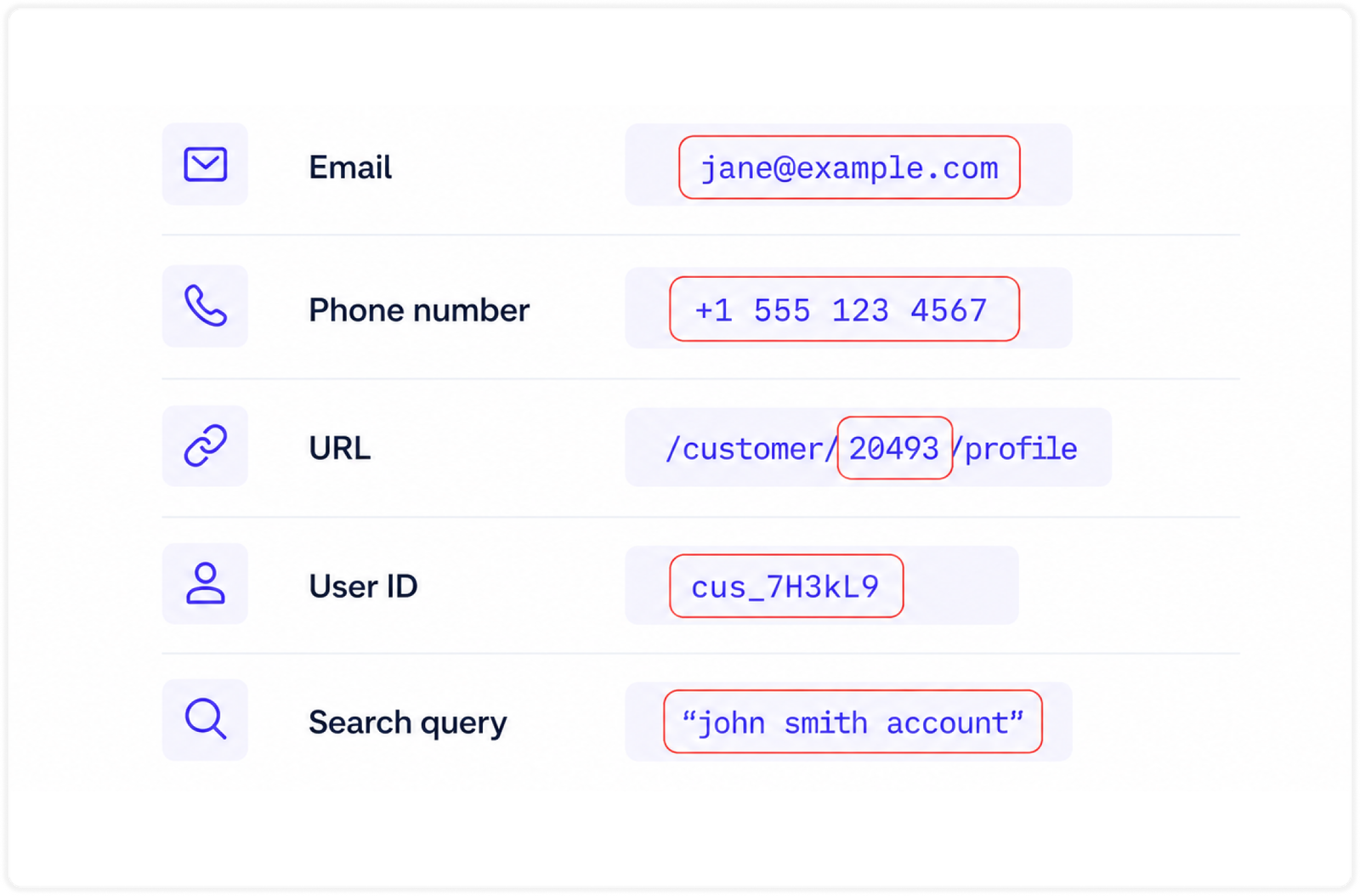
Website analytics is useful when it helps you understand what people do on your site. It becomes risky when it starts collecting details that can identify a person.
That is where PII comes in.
PII, or personally identifiable information, is any information that can identify a specific person either on its own or when combined with other data.
This guide explains what PII means, common examples to watch for and how to keep your analytics clean and privacy-friendly.
- What PII means
- Common PII examples
- What not to send to analytics
- How Plausible avoids collecting personal data
- How to redact URL identifiers with custom locations
- A quick PII review checklist
- Frequently asked questions
What PII means
PII stands for personally identifiable information.
The useful test is simple: could this value help you identify, single out or contact one specific person?
If the answer is yes, do not send it to your analytics tool.
Some information is directly identifying:
- Email address
- Full name
- Phone number
- Mailing address
- National ID number
- Payment details
- Medical, legal or financial details
Some information may become identifying when combined with other data:
- Internal user ID
- Customer ID
- Order ID
- Invoice ID
- Appointment ID
- Support ticket ID
- Exact location
- Search query that contains a name, email or phone number
Different privacy laws and internal policies may define personal data differently, so treat the examples in this article as a practical analytics hygiene guide rather than legal advice. When in doubt, collect less.
PII vs personal data
PII and personal data overlap a lot, which is why they often sound like the same thing. The difference is mostly about where the terms come from and how broadly they are used.
PII is commonly used in the US. NIST defines PII as information that can distinguish or trace someone’s identity, either alone or when combined with other linked or linkable information. In plain terms: can this data point identify or point back to a person?
Personal data is the term used by GDPR. The European Commission explains personal data as information that relates to an identified or identifiable living person. This can be broader in practice because it includes data that may not name someone directly, but can still relate back to them when combined with other information.
For example, jane@example.com is obviously both PII and personal data. A random-looking customer ID may not look personal on its own, but if your systems can connect it to one customer, it should be treated as personal data for analytics purposes too.
Sensitive PII and special category data
Some personal information needs extra care because misuse can create higher risk for the person involved.
In US-style PII language, this is often discussed as sensitive PII: information such as:
- government ID numbers
- financial account details
- medical records
- biometric data
- passwords
- other details that could lead to harm if exposed
Under GDPR and UK GDPR, some types of personal data are treated as special category data. The ICO lists these categories as data revealing racial or ethnic origin, political opinions, religious or philosophical beliefs, trade union membership, genetic data, biometric data used for identification, health data, sex life and sexual orientation.
For analytics, the guidance is simple: do not send this type of data. For example, track:
Appointment request submitted
Resource downloaded
Application form submitted
Do not track:
Therapy appointment requested by Jane Smith
Diabetes guide downloaded by user_184291
Disability accommodation request from jane@example.com
Common PII examples
Here are common places where PII can accidentally leak into analytics, and safer ways to measure the same thing:
| Where it appears | PII example | Why it is risky | Safer analytics version |
|---|---|---|---|
| URL path | /customers/cus_7H3kL9 | The ID can map to a specific customer in your systems | /customers/:id |
| Query parameter | /reset-password?email=jane@example.com | The email address identifies a person directly | /reset-password |
| Form tracking | Demo request from Jane Smith | The event includes submitted form values | Demo request form submitted |
| Custom property | user_id=184291 | The property can identify one user or account | logged_in=yes or plan=business |
| Email link | /unsubscribe/jane@example.com | The URL exposes the subscriber | /unsubscribe |
| Site search | jane@example.com | Search terms may contain names, emails, phone numbers or order details | Track that a search happened, or use broad search categories |
| Ecommerce event | order_id=order_20493 | The order can be tied back to a customer | Checkout completed |
| Support flow | ticket_id=88421 | The ticket can reveal a private support case | Support form submitted |
Let’s get deeper into the some of the most common places where personally identifiable information appears.
In URLs
URLs are one of the most common places where personal information accidentally reaches analytics tools.
This usually happens when a website puts user-specific identifiers in the path or query string:
/users/jane.smith@example.com
/profile/123456789
/customers/cus_7H3kL9
/orders/order_20493
/invoice/INV-2026-1044
/booking/appointment-88421
/reset-password?email=jane@example.com
/checkout?phone=15551234567
Even if a URL only contains an internal ID, it may still be sensitive. If that ID maps to a specific customer, account, order or person in your systems, sending it to analytics creates another place where linkable personal data is stored.
Query parameters need special attention. It is common for marketing, checkout, email and support tools to append parameters to URLs. Campaign parameters such as utm_source, utm_medium and utm_campaign are usually fine when used properly. Parameters such as email, name, phone, user_id, customer_id, token, session_id or address are not.
Plausible automatically discards query parameters from page URLs, except for campaign and referrer parameters used for attribution. You can read the full details in our data policy.
In forms
Forms collect the exact kind of information analytics should not store.
Avoid sending form field values such as:
- Email address
- Name
- Phone number
- Company address
- Billing address
- Free-text messages
- Passwords or password reset tokens
- Any health, financial, legal or employment details
This matters for any form where people can enter personal or sensitive information, including newsletter forms, signup forms, contact forms, checkout forms, quote request forms, application forms, surveys, support forms and search forms.
For analytics, you usually only need to know that a specific form was submitted, not what the person typed into it. In Plausible, that is enough to analyze form performance: total submissions, unique submissions, conversion rate, the top pages that drive submissions, referral sources, countries and devices.
To analyze one specific form, click on its URL in your dashboard to filter your stats by that form’s submissions. This gives you a complete overview of how that individual form performs without storing the submitted values.
For example, track:
Newsletter form submitted
Signup form submitted
Contact form submitted
Demo request form submitted
Checkout form submitted
Support form submitted
Do not track:
Signup form submitted by jane@example.com
Demo request from Jane Smith at Acme Corp
Checkout completed by customer_98431
Support request: "My phone number is 555-123-4567"
The first set tells you whether the form is working. The second set tells you who filled it out, which is exactly what analytics does not need to know.
In user IDs
User IDs can feel harmless because they are often internal strings rather than names or emails. But they can still identify people inside your system.
Avoid sending values like:
user_id=184291
customer_id=cus_93Hsk2
account_id=acct_58291
member_id=mem_77731
subscriber_id=sub_9340
If the value maps to one person, one account or one household in your database, treat it as personal data for analytics purposes.
This is especially important for product analytics, SaaS dashboards and logged-in areas. It can be tempting to send a user ID with every event so you can understand individual behavior later.
Track aggregate behavior instead:
Plan: free
Plan: business
Role: admin
Logged in: yes
Feature: reports
Those properties can be useful for understanding product usage without exposing the identity of a specific person.
If you use Plausible custom properties (same thing as custom dimensions in GA4), use them for broad, non-identifying labels and never for emails, names, user IDs or other identifiers. See the custom properties documentation for how to attach extra context safely.
In emails
Email addresses are direct identifiers. Do not put them in page URLs, event names, custom properties, referrers or search parameters.
Watch for patterns like:
/unsubscribe/jane@example.com
/newsletter/preferences?email=jane@example.com
/invite?recipient=jane@example.com
/account/jane@example.com
Email tools sometimes generate links with subscriber identifiers or email addresses in the URL. If those pages are tracked, the values may end up in analytics unless they are stripped, redacted or replaced before tracking.
A safer pattern is:
/unsubscribe
/newsletter/preferences
/invite
/account
You can still measure visits and conversions on these pages. You just do not need to store who the page was for.
In search queries
Search queries are easy to overlook because most searches are harmless. People search for things like “pricing”, “refund policy”, “analytics dashboard” or “integration docs”.
But search boxes also get used for personal information:
jane@example.com
Jane Smith
555-123-4567
order 20493
invoice INV-2026-1044
appointment for Jane Smith
If you track internal site search, avoid sending raw search terms when your users may search for people, customers, orders, tickets, invoices, email addresses or other sensitive records.
For public content sites, tracking popular search terms can be useful. For logged-in tools, CRMs, support systems, health portals, finance apps or admin dashboards, it is safer to track only that a search happened, or to categorize searches without storing the exact query.
What not to send to analytics
As a rule, do not send anything to analytics that identifies a person, account, household, transaction or private case.
Avoid sending:
- Email addresses, names, phone numbers and physical addresses
- User IDs, customer IDs, account IDs and membership IDs
- Order IDs, invoice IDs, booking IDs and ticket IDs
- Authentication tokens, password reset tokens and session IDs
- Payment details, coupon codes tied to one person or billing metadata
- Free-text form submissions
- Internal search queries that may include personal data
- IP addresses or full user agents as custom data
- Any health, legal, financial, employment or other sensitive information
The goal is not to make analytics useless. It is to measure the thing you actually need:
- A signup happened
- A file was downloaded
- A form was submitted
- A plan type converted
- A feature was used
- A campaign brought visitors
- A page performed well
You rarely need to know exactly which person did it inside your web analytics dashboard.
How Plausible avoids collecting personal data
Plausible is privacy-first by design. It is built for aggregate website analytics, not individual tracking.
We do not use cookies. We do not generate persistent identifiers. We do not track people across websites, devices or days. We do not store IP addresses. We discard full user agents after deriving limited browser, operating system and device information. All visitor data is processed and stored in the EU.
Plausible measures only essential website analytics data such as page URL, referrer, browser, operating system, device type and approximate location such as country, region and city (instead of precise coordinates). The goal is to show overall trends in your website traffic, not to build profiles of individual visitors.
You can read the full list of what Plausible collects, how unique visitors are counted without cookies and how data is handled in our data policy. For a broader overview, see our guide to privacy-focused web analytics.
That said, your implementation still matters. If your website puts personal data in page paths, event names or custom properties, you should redact it before it reaches analytics.
How to redact URL identifiers with custom locations
Sometimes your website needs user-specific URLs for the product to work:
/users/184291
/customers/cus_93Hsk2
/orders/order_20493
/invoices/INV-2026-1044
For analytics, those should usually be grouped into privacy-friendly paths:
/users/:id
/customers/:id
/orders/:id
/invoices/:id
In Plausible, you can do this by configuring a custom location before the pageview is sent. This lets you replace the actual URL with a clean, non-identifying version in your reports.
For example, instead of recording many separate pages like:
/profile/123
/profile/456
/profile/789
you can record them as:
/profile/:id
That improves privacy and makes your Pages report easier to read. Instead of fragmented rows for each person or record, you get one useful aggregate row.
Follow the setup steps in our custom locations documentation. This is the main tool to use when identifiers live in the URL path.
If the extra context you want to collect is not identifying, such as plan type, content author, logged-in status or button placement, use custom properties instead. Keep those values broad and non-personal.
A quick PII review checklist
Before sending a value to analytics, ask:
- Does this identify a person directly?
- Can our team link this ID back to a person, account, order or ticket?
- Could this field contain free-text personal information?
- Is this a token, session ID, password reset link or private URL?
- Can we replace it with a grouped path like
/customers/:idor a broad label likeplan=business?
If a value points to a person, remove it, replace it with a generic label or group it into a non-identifying pattern before it reaches analytics.
Good analytics should help you understand what works on your website without making your visitors identifiable. Measure the pattern, not the person.
Frequently asked questions
Is an email address PII?
Yes. An email address directly identifies or contacts a person, so it should not be sent to analytics in URLs, form events, custom properties, search terms or campaign parameters.
Is an IP address PII?
It can be. Under GDPR, IP addresses are listed as an example of personal data. For analytics, the safer approach is not to store IP addresses. Plausible uses IP addresses only briefly to derive approximate location and count unique visitors, then discards them.
Is a user ID PII?
Yes, if it maps to a specific person, account or household in your systems. Even if the ID is not meaningful to outsiders, it is still linkable inside your organization. Use broad labels such as plan, role or logged-in status instead.
Is an order ID PII?
Treat it as personal data for analytics purposes if the order can be linked back to a customer. You can still track that checkout was completed, revenue was generated or a product category converted without sending the raw order ID.
Are search queries PII?
They can be. Search terms are often harmless on public content sites, but people may type names, email addresses, phone numbers, order numbers or health and support details into search boxes. If your search can include private records, avoid sending raw queries to analytics.
Can I track forms without collecting PII?
Yes. Track that a form was submitted, not the values someone typed into it. In Plausible, form tracking can show total submissions, unique submissions, conversion rate, top pages, referral sources, countries and devices without storing the submitted form contents.
What is not PII in analytics?
Aggregate metrics such as pageviews, total form submissions, conversion rates, broad device type, referral source and page paths without personal identifiers are generally safer analytics data. The key is that the value should not identify or single out one person.